Agent Node
1. Component Intro
The Agent Component is a high-level execution node that triggers specialized AI agents within your workflow. Unlike a standard LLM node that simply generates text, an Agent is often wrapped in a framework (like LangChain) that allows it to use tools, manage its own state, and follow complex, multi-step reasoning paths to solve a specific query.
Core JSON Structure
[[JSON]]
{
 "name": "Agent_Component",
 "type": "agent",
 "description": "Executes a specialized AI agent within the workflow.",
 "output_type": "string",
 "inputs": {
  "agent_id": "agent-123",
  "framework": "langchain",
  "temperature": 0.7,
  "timeout": 30,
  "query": "{{llm_component.output}}",
  "max_retries": 3
 }
}
2. Where to Use It
-
Complex Problem Solving: Tasks that require more than one "thought" step, such as researching a topic and then writing a summary.
-
Tool Orchestration: When you need an AI to decide which API or Database to call based on a user's question.
-
Legacy Framework Support: Integrating existing agents built in LangChain or other supported frameworks directly into the Workflow Weaver.
-
Autonomous Customer Support: Handling requests that involve checking a subscription status, verifying a policy, and then generating a response.
3. How to Initialize
-
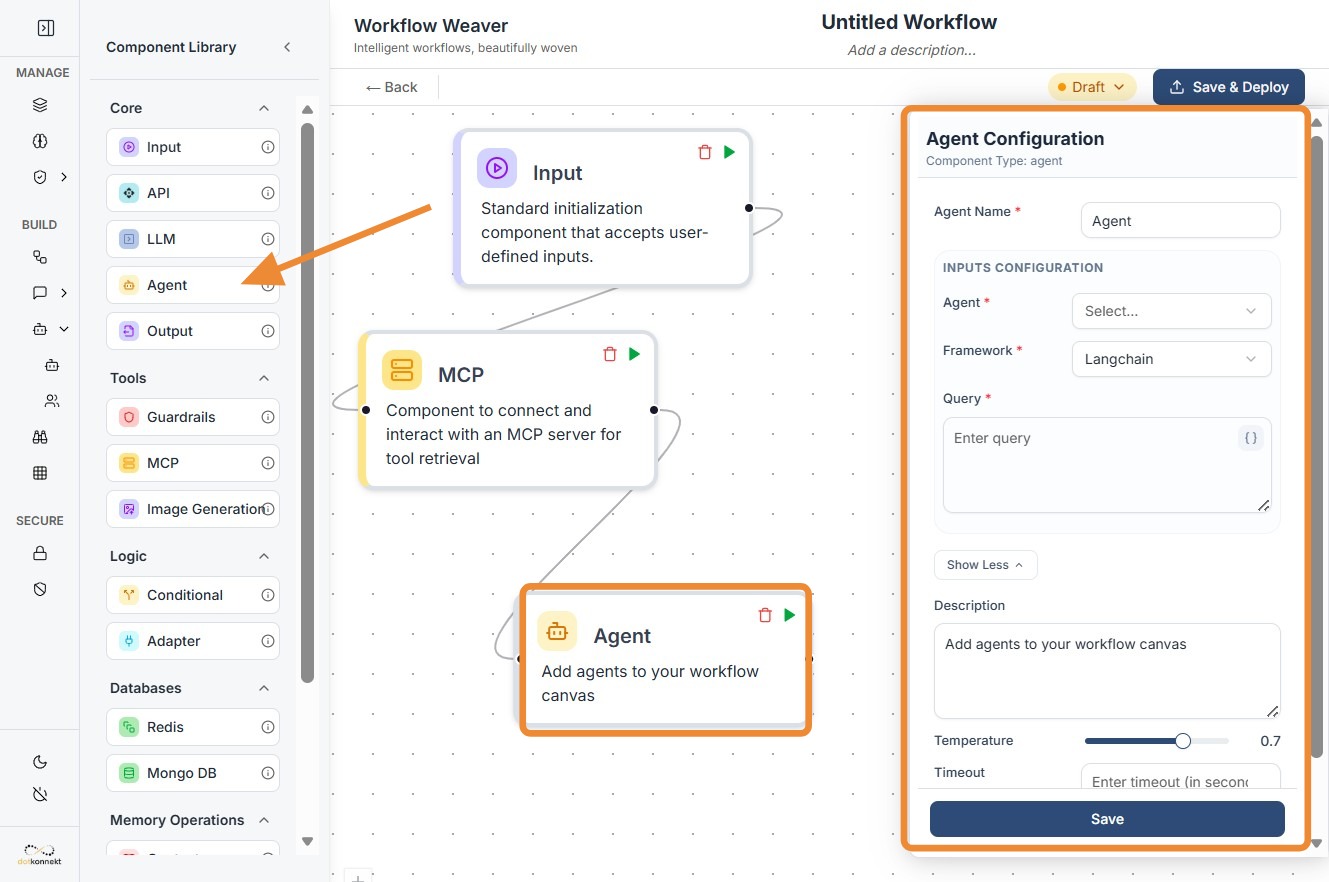
Add Node: Drag the
Agentcomponent from the library and place it on your canvas. -
Select Agent & Framework: Enter the
agent_idand choose the correspondingframework(e.g., LangChain) the agent was built on. -
Set Execution Parameters: * Temperature: Adjust the creativity (typically 0.7 for general queries).
-
Timeout: Set a time limit in seconds (e.g., 30) to prevent the workflow from hanging.
-
Max Retries: Define how many times the agent should attempt the task if it fails (e.g., 3).
-
Map the Query: Map the
queryfield to a previous node using{{componentID.output}}. -
Format Consistency: Ensure the input and output are connected via String data. If you are receiving JSON from a previous node, you must use an Adapter Component first.
-
Connect Ports: Link the input dot to the trigger/data source and the output dot to the next processing step.
Agent Node-
Do's and Don'ts
Do's
-
Use the Adapter Node: Always use an Adapter Component before the Agent if your incoming data is in JSON format, as this node strictly requires a
stringinput. -
Set Realistic Timeouts: Give the agent enough time (at least 30-60 seconds) for complex reasoning tasks that involve multiple tool calls.
-
Monitor Retries: Set a reasonable
max_retries(2 or 3) to handle transient network issues without causing infinite loops. -
Provide Clear Queries: Ensure the
querypassed to the agent is descriptive; vague queries lead to poor agent performance and wasted tokens.
Don'ts
-
Ignore Data Formats: Don't pass a raw JSON object directly into the
queryfield; the agent will likely fail to parse it or produce gibberish. -
Over-complicate the Framework: Don't use a heavy Agent framework for simple text transformation; use a standard LLM Node for better speed and lower cost.
-
Hardcode Agent IDs: Don't forget that if you update your agent in the backend, you must ensure the
agent_idin the workflow matches the new version. -
Leave Disconnected: Don't forget that like all logic nodes, the Agent requires a trigger signal via the input port to start execution.
Tip: String-Only Constraints
The Agent component is strictly String-in, String-out.
Why? Most agent frameworks are designed to handle natural language prompts. If your data is currently in a complex JSON object, use the Adapter Component to "Flatten" or "Stringify" that data before it hits the Agent.
Troubleshooting: Timeout Errors
If your Agent node frequently returns a timeout error:
- Increase the Timeout: Try moving from 30 to 60 or 90 seconds.
- Check Tool Latency: Ensure the tools/APIs the agent is calling are responding quickly.
- Simplify the Task: If the task is too broad, the agent may be getting stuck in a reasoning loop.