Redis Node
1. Component Intro: Redis
The Redis Component is a database integration node that allows the workflow to interact with a Redis key-value store. It is primarily used for high-speed data caching, session management, and state persistence across different stages of a workflow. It supports standard CRUD operations, specifically GET and SET, to manage dynamic data efficiently.
Core JSON Structure (General)
[[JSON]]
{
 "name": "Redis_Client",
 "type": "redis",
 "description": "Component to interact with Redis databases for caching and data retrieval.",
 "output_type": "json",
 "inputs": {
  "operation": "GET",
  "key": "{{input.user_id}}",
  "redis_username": "admin",
  "redis_password": "secure_password"
 }
}
2. Where to Use It
-
Caching LLM Responses: Store expensive API or LLM results using a
SEToperation to reuse them later, reducing costs and latency. -
Session Management: Retrieve user-specific context or history using a
GEToperation based on a unique session ID or user ID. -
Rate Limiting: Track the number of requests made by a specific user to enforce usage limits.
-
State Persistence: Pass data between different executions of a workflow by storing variables in a centralized Redis instance.
3. How to Initialize
-
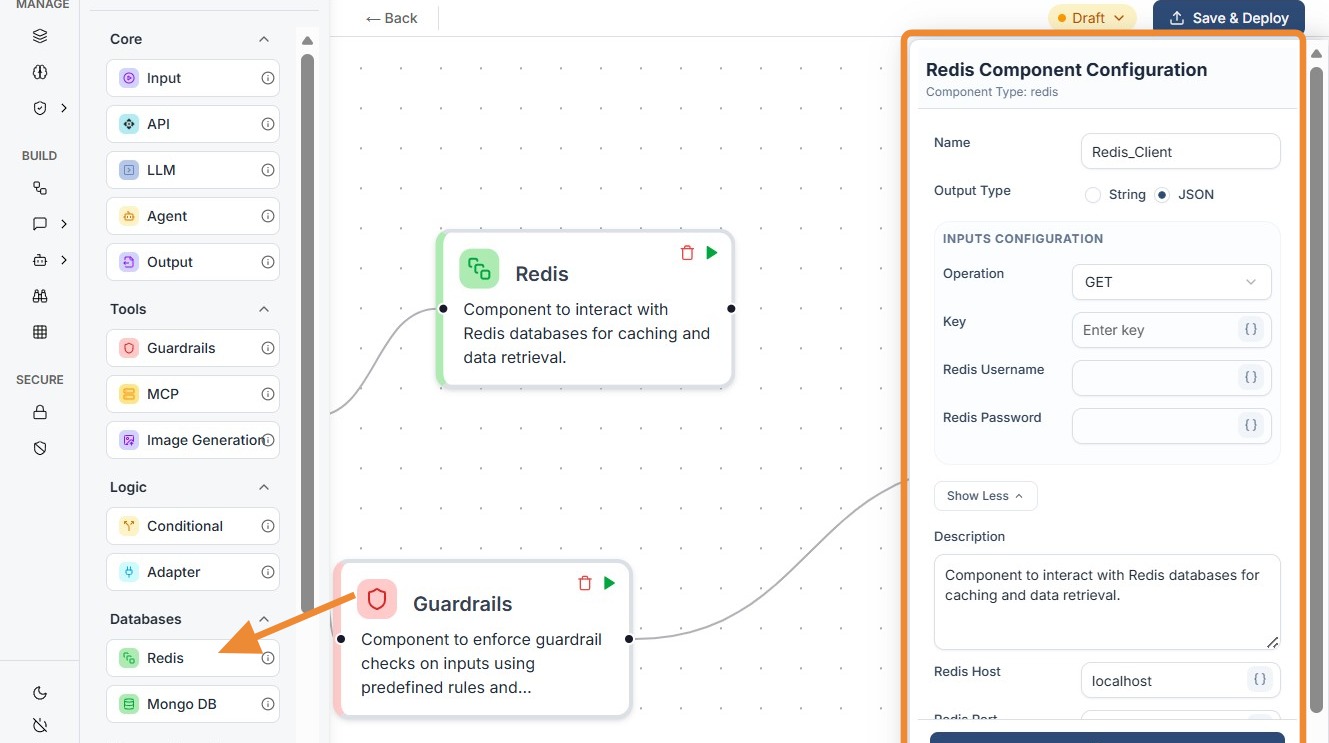
Add Node: Locate Redis under the Databases section in the Component Library and drag it onto the canvas.
-
Select Operation: In the configuration panel, choose between
GET(to retrieve data) orSET(to store data). -
Define the Key: Enter the specific key name. You can use a static string or a
componentIDlike{{Input.user_id}}to make it dynamic. -
Configure Authentication: Enter the Redis Username and Redis Password.
Note: It is recommended to use environment variables or secret vault references for these fields.
- Connect Ports: Link the input port (left dot) to a preceding node (like an Input or LLM) and the output port (right dot) to the next step in your logic (like a Conditional or Output node).
Do's and Don'ts
Do's
-
Use Dynamic Keys: Always use
componentIDreferences (e.g.,{{Input.user_id}}) for keys to ensure your caching logic is unique to each user or session. -
Match Data Types: Ensure the Output Type (String or JSON) matches the actual data structure stored in your Redis instance to avoid parsing errors.
-
Secure Credentials: Utilize global configuration variables or secret management for Redis Username and Password instead of hardcoding plain text.
-
Handle Null Responses: Design your downstream logic (using a Conditional node) to handle cases where a
GEToperation returns no data for a specific key. -
Use for Caching: Use the
SEToperation to store results of high-latency nodes (like LLMs or complex APIs) to speed up subsequent workflow runs.
Don'ts
-
Store Oversized Data: Don't store massive datasets or high-resolution images in Redis; it is optimized for small, fast-access key-value pairs.
-
Ignore Connection Errors: Don't forget to verify that your Redis host and port are accessible from the Workflow Weaver environment; firewall blocks are a common cause of failure.
-
Use Static Keys for Multi-user Apps: Don't use a static key like
"user_data"if your workflow serves multiple users, as this will lead to data overwrites and privacy leaks. -
Bypass Input Connections: Don't leave the input port (left dot) disconnected; even for a
GEToperation, the node requires a trigger from the preceding flow. -
Overlook TTL: Don't forget that data in Redis is often temporary; ensure your workflow logic doesn't assume data will persist indefinitely if your Redis server has expiration policies.