MCP Node
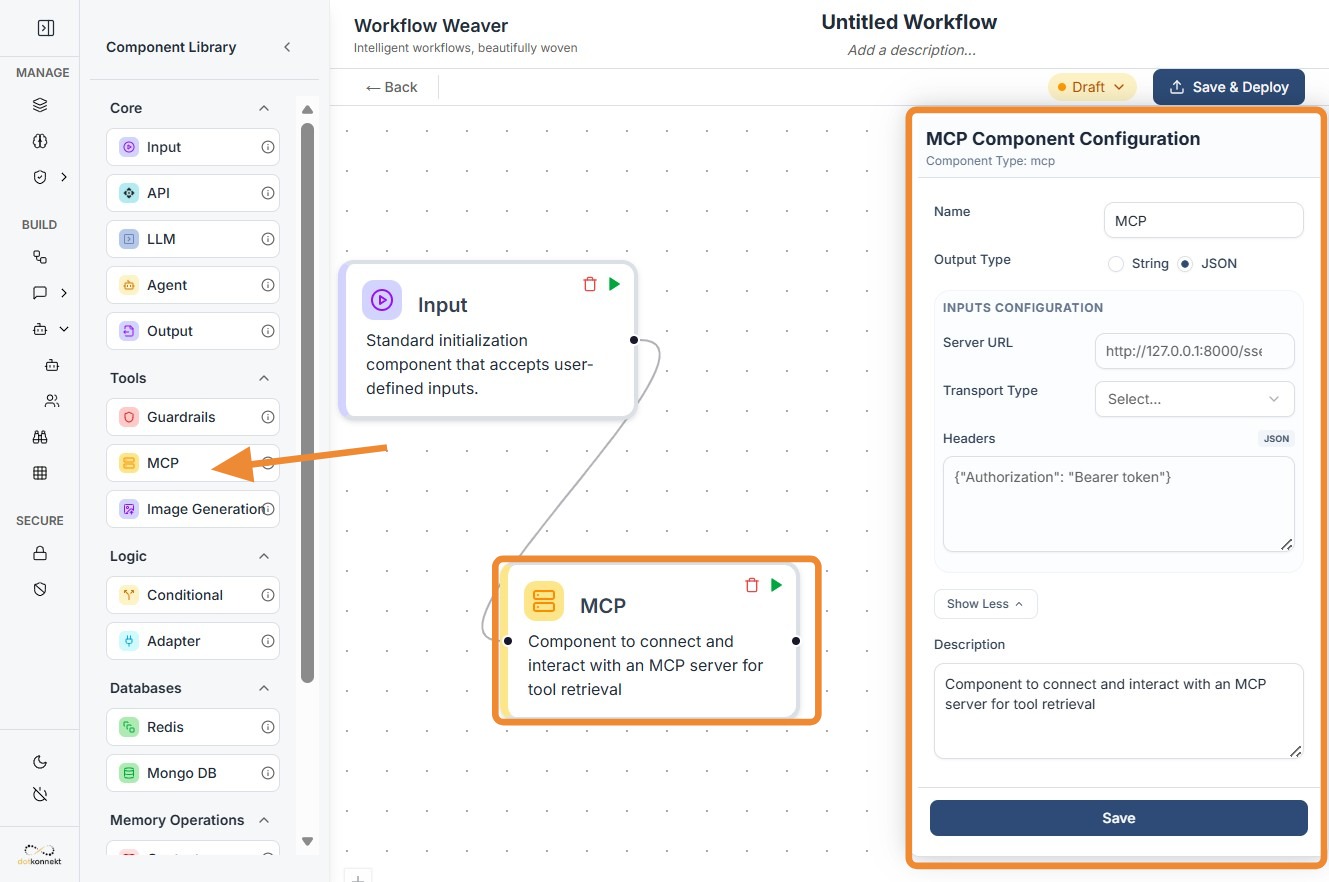
1. Component Intro
The MCP Component is a discovery node designed to interface with servers running the Model Context Protocol. It acts as a standardized bridge that "scans" an external server to identify available tools, resources, and prompts. Once discovered, these capabilities are passed to an LLM, transforming a static model into a dynamic agent capable of executing real-world actions like querying databases or searching the web.
Core JSON Structure
[[JSON]]
{
 "name": "MCP_Tools_Discovery",
 "type": "mcp",
 "description": "Discovers tools from an MCP server for AI agent use.",
 "output_type": "json",
 "inputs": {
  "server_url": "http://127.0.0.1:8000/sse",
  "transport": "sse",
  "headers": {
    "Authorization": "Bearer {{vault.mcp_token}}"
  }
 }
}
2. Where to Use It
-
Dynamic Tool Discovery: Automatically fetch the latest list of available functions from a server without hardcoding individual tools.
-
Agentic Workflows: Power autonomous agents by giving them a "toolbox" they can use to interact with external databases or file systems.
-
Enterprise Integrations: Connect your AI to secure internal services like a CRM or proprietary knowledge base using a single, unified protocol.
-
Modular Knowledge Injection: Update the model's capabilities in real-time by simply adding new tools to the MCP server.
3. How to Initialize
-
Add Node: Drag the
MCPcomponent from the Databases/Integrations section onto the canvas. -
Configure Server URL: Enter the endpoint of your MCP server (e.g.,
http://localhost:8000/sse). This is usually static but can accept dynamiccomponentIDs. -
Select Transport: Choose the communication method. SSE (Server-Sent Events) is typical for remote servers, while stdio is used for local processes.
-
Set Headers: Manually configure any required authentication, such as
Bearertokens, to allow the discovery request to pass through security filters. -
Connect to LLM: Link the output dot of the MCP node to the input of an LLM node. This "registers" the discovered tools with the model.
MCP Node-
Do's and Don'ts
Do's
-
Secure Your Headers: Always use the secret vault or environment variables for
Authorizationtokens to prevent exposure of sensitive keys. -
Match Transports: Ensure your
transporttype (SSE vs stdio) matches exactly what your MCP server is configured to handle. -
Verify Discovery: Use a JSON Parser or log the output to verify that the server is returning the expected tool schemas before passing them to an LLM.
-
Use for Versioning: Leverage MCP discovery to handle tool versioning; your agent will automatically see new tool versions as they are published to the server.
Don'ts
-
Bypass Input Connections: Do not leave the input node disconnected; the MCP discovery must be triggered as part of the workflow sequence.
-
Ignore Server Latency: Don't point to unstable or slow servers; a timeout during discovery will cause the subsequent LLM node to lack its necessary tools.
-
Hardcode Sensitive Credentials: Avoid typing plain-text passwords directly into the
headersfield; it is a significant security risk. -
Overload the LLM: Don't connect an MCP server that exposes hundreds of irrelevant tools, as this can confuse the LLM and lead to higher token costs.
Made with Scribe
Troubleshooting: Transport Mismatch
If your MCP node is failing to discover tools:
Tip
Check if your server requires SSE (Server-Sent Events) or the newer Streamable HTTP. Most modern remote MCP implementations are moving toward Streamable HTTP, but older clients (like some Desktop AI apps) still strictly require stdio or legacy SSE.